Document loading
Please refer Formats for information about what file-types can be displayed.
Document Loading
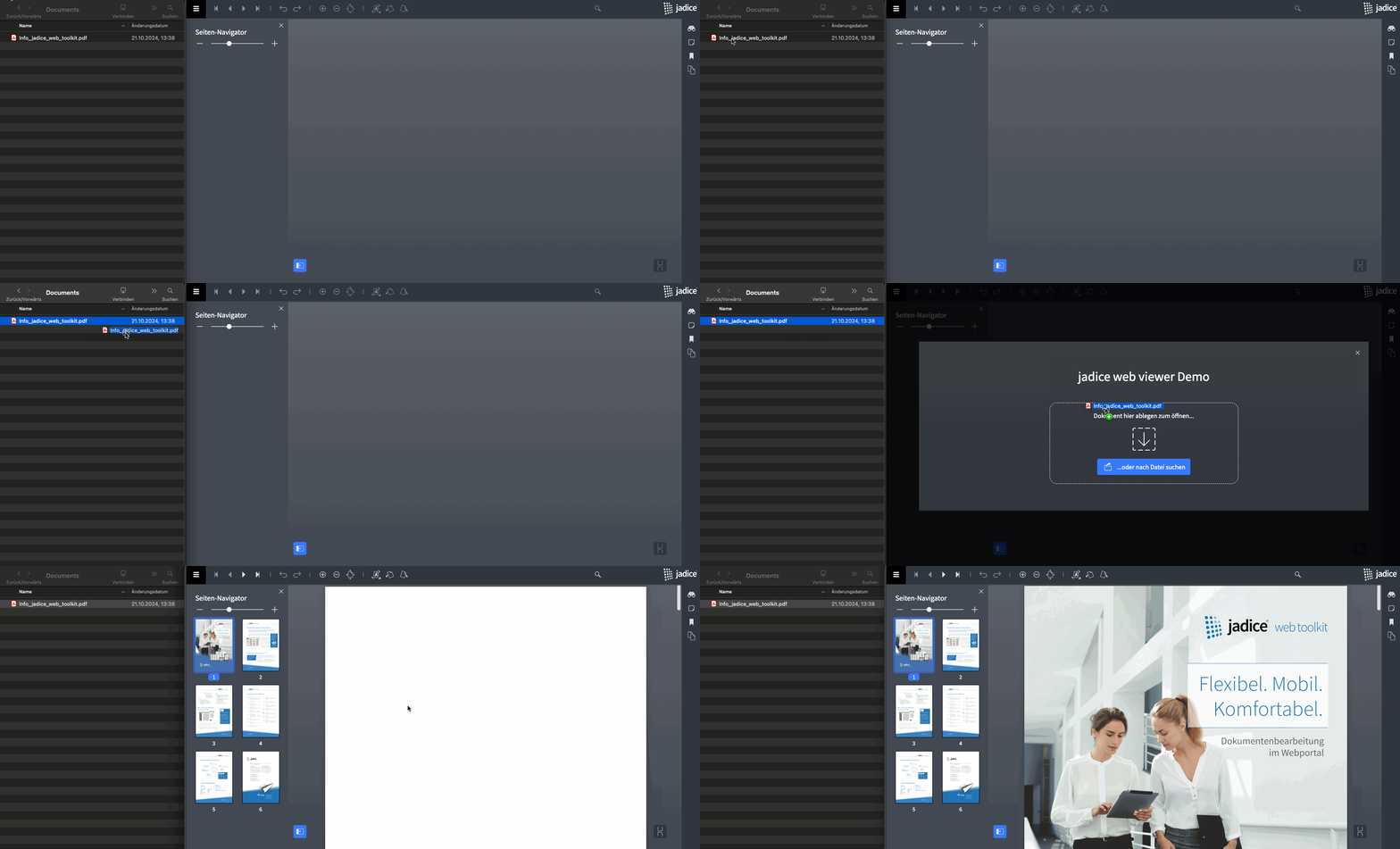
Drag & Drop
Documents can simply be display by dragging them from your computer and dropping them in the according area of the jadice web viewer.
When you start dragging, the file-open-dialog will be automatically opened.
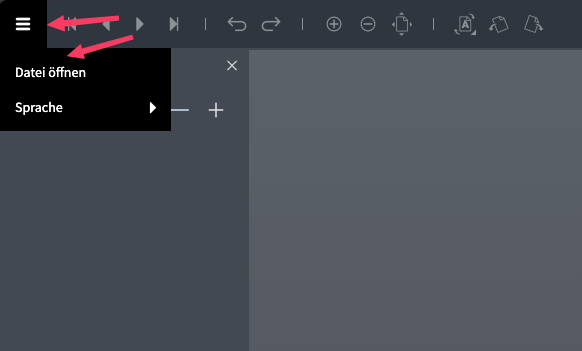
Open File
URL
When you open the viewer and pass a request-param named u, the document will be loaded directly.
The u-param accepts a URL-encoded Source that looks like that:
{
  "uris":[
    "https://www.digbib.org/Franz_Kafka_1883/Die_Verwandlung_.pdf"
  ]
}
The URL to open that document will look as follows:
https://web-viewer.jadice.com/?u=%7B%0A%20%20%22uris%22%3A%5B%0A%20%20%20%20%22https%3A%2F%2Fwww.digbib.org%2FFranz_Kafka_1883%2FDie_Verwandlung_.pdf%22%0A%20%20%5D%0A%7D
If you provide more than one URI, the documents are loaded in the given order and displayed as a single merged document.
JavaScript API
It is possible to load documents via the JavaScript API. The syntax is simplified form of the "fusion collection" that is used in other levigo products. A more detailed description can be found here.
const compositePaged = {
    pageSequences: [{
        mediaType: "application/pdf",
        contentURI: "https://www.digbib.org/Franz_Kafka_1883/Die_Verwandlung_.pdf"
    }],
    type: "compositePaged"
}

window.viewerApi.collectionApi.showCompositePaged(compositePaged)
Loading Multiple documents
To get a selection of multiple documents you can achieve this with the JavaScript API as follows:
const collection = {
    elements: [
        {
            specification: {
                type: "compositePaged",
                pageSequences: [
                    {
                        mediaType: "application/pdf",
                        contentURI: "https://www.digbib.org/Franz_Kafka_1883/Der_Prozess_.pdf",
                    }
                ]
            },
            metadata: {override_page_sequence_name: "Der Prozess", override_page_sequence_description: "Franz Kafka: Der Prozess"}
        },
        {
            specification: {
                type: "compositePaged",
                pageSequences: [
                    {
                        mediaType: "application/pdf",
                        contentURI: "https://www.digbib.org/Franz_Kafka_1883/Das_Urteil_.pdf"
                    }
                ]
            },
            metadata: {override_page_sequence_name: "Das Urteil", override_page_sequence_description: "Franz Kafka: Das Urteil"}
        }
    ]
};

window.viewerApi.collectionApi.showCollection(collection);
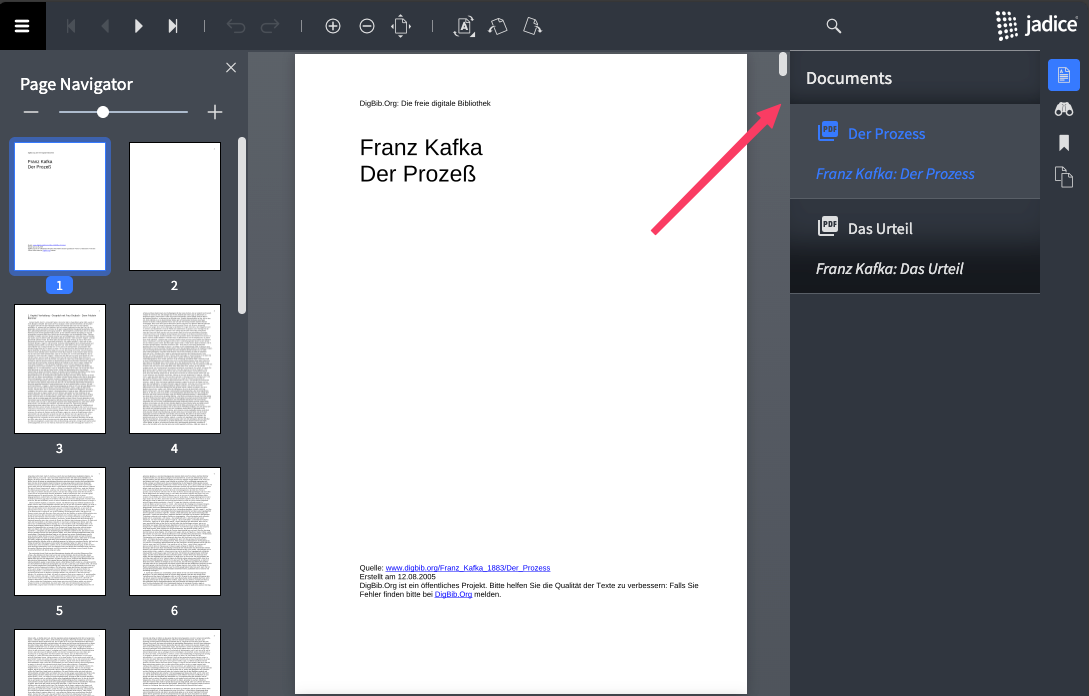
This will enable the document selection sidebar:
Loading Annotation Streams for Documents
To associate one or more annotation streams with each document in a compositePaged document, add an annotationData array to your compositePaged specification. Each entry in annotationData corresponds, in order, to a single document and may itself contain zero or more annotation-URI strings.
const collection = {
    elements: [
        {
            specification: {
                type: "compositePaged",
                pageSequences: [
                    {
                        mediaType: "application/pdf",
                        contentURI: "https://www.digbib.org/Franz_Kafka_1883/Der_Prozess_.pdf",
                    }
                ],
                annotationData: [
                	["http://example.com/annotation101.xml"]
                ]
            },
            metadata: {override_page_sequence_name: "Der Prozess", override_page_sequence_description: "Franz Kafka: Der Prozess"}
        }
    ]
};
window.viewerApi.collectionApi.showCollection(collection);
How It Works
-
pageSequences - Defines each document’s media type and source URI.
-
annotationData - An array of arrays, where each inner array holds the annotation-URI strings for the corresponding document in pageSequences.
-
An empty inner array ([]) indicates no annotations for that document.
-
Multiple URIs may be provided to load several annotation streams.
-
Example: Multiple Documents with Variable Annotations
annotationData: [
    ["http://example.com/annotation101.xml", "http://example.com/annotation102.xml"], // annotation data for the first document -> two annotation streams
    [], // annotation data for the second document -> empty
    ["http://example.com/annotation301.xml"] // annotation data for the third document -> onw annotation stream
]