Flow rest API
Rest Endpoints
jadice flow controller serves as transparent service that hands off the execution of jobs to workers. It provides the current job status to the client whilst abstracting away the scalability-related aspects of workers. Therefore, jadice flow controller is the only communication endpoint of a client to handle jobs.
To run a job, you basically need three different API calls:
- Post a job (and receive job ID in response):
POST /job/create - Query status of the job until FINISHED:
GET /job/execution/{jobId} - Get result as soon as the job is FINISHED:
GET /job/result/{jobId}
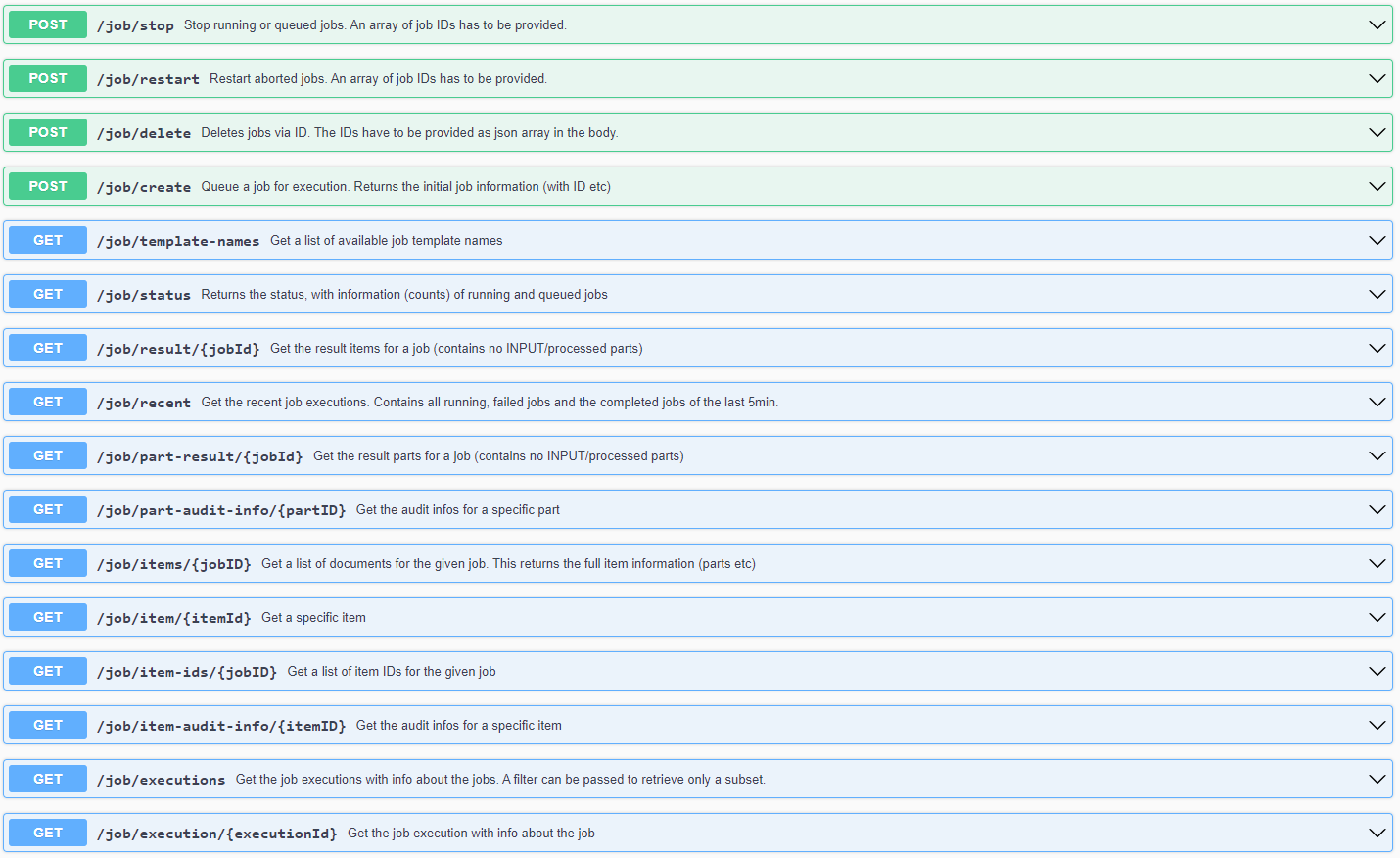
In the following are possible jadice flow controller endpoints with their functionalities listed.
Job related functions to handle jobs:
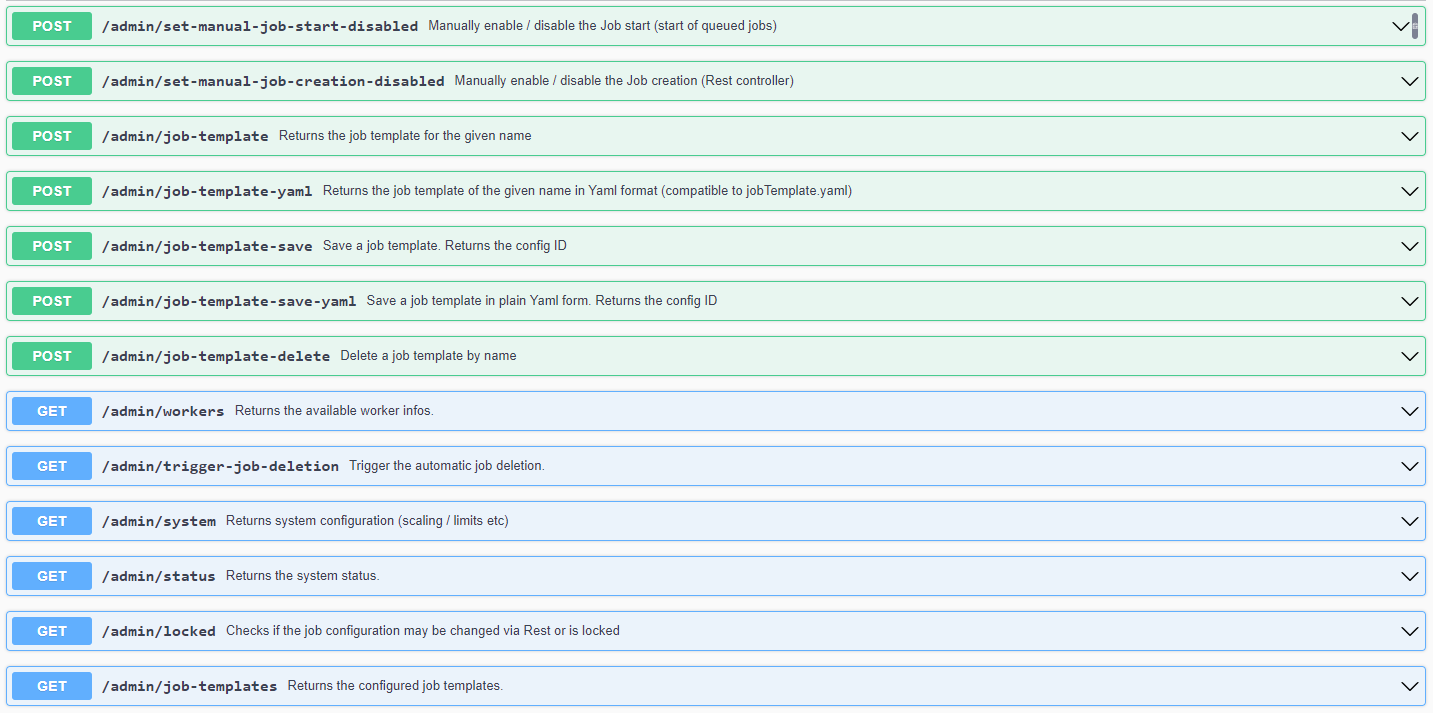
Admin related functions to retrieve / modify configuration:
Please note that the controller also provides a optional swagger UI (default URL is http://controller-server:8080/swagger-ui.html) which provides details to all endpoints. The following samples provide a basic overview of the most important operations.
If keycloak is enabled, don't forget to pass the access token (
Bearer-Token in theAuthorizationHeader field) with all requests! See Keycloak section.
Samples
List of available job template names
Example result for GET /job/template-names
[
    "ImageToPDF",
    "ImageToTIFF",
    "afp",
    "afp-convert",
    "document-content-extractor",
    "ocr",
]
The resulting string array contains all names for enabled job templates.
Create a job
Create a job: POST /job/create with the JobRequest:
Sample request for POST /job/create
{
  "jobTemplateName": "imageToPdfWithHOCR",
  "priority": 0,
  "items": [
    {
      "parts": [
        {
          "url": "https://example.jadice.de/files/Test.jpg",
          "filename": "Test.jpg",
          "type": "BASE_PART",
          "mimeType": "image/jpeg",
        }
      ]
    }
  ]
}
This will send a request with the part "Test.jpg" to be processed by flow with the imageToPdfWithHOCR template.
Check the result:
Example result for POST /job/create
{
    "jobExecutionID": 18,
    "traceID": null,
    "status": "STARTING",
    "exitStatus": "UNKNOWN",
    "currentQueuePosition": -1,
    "jobName": null,
    "startTime": null,
    "createTime": "2023-08-15T10:22:56.656+00:00",
    "endTime": null,
    "lastUpdated": null,
    "failureExceptions": [],
    "priority": 0,
    "creatorHost": null,
    "creatorIP": null,
    "stepInformations": [],
    "jobAuditInformation": null,
    "allFailureExceptions": []
}
The currentQueuePosition might return a negative value if the job has been started instantly. Otherwise the value indicates the position of the job within the job queue.
Check job status
Most noteworthy status values:
- STARTING: Job is queued, but has not really started yet
- STARTED: Job is running
- COMPLETED: Job is finished
- FAILED: Job failed
Example result for POST /job/execution/JOB-ID
{
    "jobExecutionID": 18,
    "traceID": "",
    "status": "COMPLETED",
    "exitStatus": "exitCode=COMPLETED;exitDescription=",
    "currentQueuePosition": -1,
    "jobName": "imageToPdfWithHOCR",
    "startTime": "2023-08-15T10:22:56.658+00:00",
    "createTime": "2023-08-15T10:22:56.651+00:00",
    "endTime": "2023-08-15T10:23:02.885+00:00",
    "lastUpdated": "2023-08-15T10:23:02.885+00:00",
    "failureExceptions": [],
    "priority": 0,
    "creatorHost": "10.42.4.0",
    "creatorIP": "10.42.4.0",
    "stepInformations": [
        {
            "stepExecutionID": 27,
            "jobExecutionID": 18,
            "stepName": "filetypeAnalyzer",
            "summary": "StepExecution: id=27, version=4, name=filetypeAnalyzer, status=COMPLETED, exitStatus=COMPLETED, readCount=1, filterCount=0, writeCount=1 readSkipCount=0, writeSkipCount=0, processSkipCount=0, commitCount=2, rollbackCount=0",
            "status": "COMPLETED",
            "exitStatus": "exitCode=COMPLETED;exitDescription=",
            "startTime": "2023-08-15T10:22:56.663+00:00",
            "endTime": "2023-08-15T10:22:57.209+00:00",
            "lastUpdated": "2023-08-15T10:22:57.209+00:00",
            "failureExceptions": []
        },
        {
            "stepExecutionID": 28,
            "jobExecutionID": 18,
            "stepName": "ocr",
            "summary": "StepExecution: id=28, version=4, name=ocr, status=COMPLETED, exitStatus=COMPLETED, readCount=1, filterCount=0, writeCount=1 readSkipCount=0, writeSkipCount=0, processSkipCount=0, commitCount=2, rollbackCount=0",
            "status": "COMPLETED",
            "exitStatus": "exitCode=COMPLETED;exitDescription=",
            "startTime": "2023-08-15T10:22:57.213+00:00",
            "endTime": "2023-08-15T10:22:59.947+00:00",
            "lastUpdated": "2023-08-15T10:22:59.947+00:00",
            "failureExceptions": []
        },
        {
            "stepExecutionID": 29,
            "jobExecutionID": 18,
            "stepName": "pdf",
            "summary": "StepExecution: id=29, version=4, name=pdf, status=COMPLETED, exitStatus=COMPLETED, readCount=1, filterCount=0, writeCount=1 readSkipCount=0, writeSkipCount=0, processSkipCount=0, commitCount=2, rollbackCount=0",
            "status": "COMPLETED",
            "exitStatus": "exitCode=COMPLETED;exitDescription=",
            "startTime": "2023-08-15T10:22:59.951+00:00",
            "endTime": "2023-08-15T10:23:02.883+00:00",
            "lastUpdated": "2023-08-15T10:23:02.883+00:00",
            "failureExceptions": []
        }
    ],
    "jobAuditInformation": null,
    "allFailureExceptions": []
}
The job has status COMPLETED and also its steps provide some general information and are finished, too. When waiting for a Job, the status can be polled until it reaches COMPLETED or FAILED.
Getting the result of a job
Only the result parts
This will only return parts which are not of type META. So processed/converted parts will not show up.
Example result for POST /job/result/JOB-ID
[
    {
        "id": 18,
        "processingProperties": {},
        "indexData": {},
        "parts": [
            {
                "id": 37,
                "url": "https://example.jadice.de/files/jf-worker-topdf-56657fdbd6-ll6gr-10.42.9.89-1692024345349_e340cc5d-bd9e-45d2-b412-b11e1bc7f792.pdf",
                "filename": "jf-worker-topdf-56657fdbd6-ll6gr-10.42.9.89-1692024345349_e340cc5d-bd9e-45d2-b412-b11e1bc7f792.pdf",
                "type": "BASE_PART",
                "mimeType": "application/pdf",
                "processingProperties": {
                    "stream-descriptor-uuid": "jf-worker-topdf-56657fdbd6-ll6gr-10.42.9.89-1692024345349",
                    "isPdf": "true",
                    "parent-stream-descriptor-uuid": "jf-worker-topdf-56657fdbd6-ll6gr-10.42.9.891692024345243",
                    "PDFAFlavour": "2b",
                    "description": "jf-worker-topdf-56657fdbd6-ll6gr-10.42.9.89-1692024345349_e340cc5d-bd9e-45d2-b412-b11e1bc7f792.pdf",
                    "isEncryptedPdf": "false",
                    "pageCountIsCorrect": "true",
                    "isCompliant": "true",
                    "created-by": "pdf"
                }
            }
        ]
    }
]
This result contains a list of items (in this case 1 item) with one result part.
A list of all items / parts:
To get a full list with all items / parts. This also contains the processed META parts (input/intermediate parts).
Example result for POST /job/items/JOB-ID
[
    {
        "id": 18,
        "processingProperties": {},
        "indexData": {},
        "parts": [
            {
                "id": 35,
                "url": "https://example.jadice.de/files/Test.jpg",
                "filename": "Test.jpg",
                "type": "META",
                "mimeType": "image/jpeg",
                "processingProperties": {}
            },
            {
                "id": 36,
                "url": "https://example.jadice.de/files/Test.hocr",
                "filename": "Test.hocr",
                "type": "META",
                "mimeType": "application/vnd.hocr+html",
                "processingProperties": {
                    "stream-descriptor-uuid": "jf-worker-tessocr-68f89848f5-854x8-10.42.10.128-1692024946696",
                    "description": "Test.hocr",
                    "src-part-id": "35",
                    "created-by": "ocr"
                }
            },
            {
                "id": 37,
                "url": "https://example.jadice.de/files/jf-worker-topdf-56657fdbd6-ll6gr-10.42.9.89-1692024345349_e340cc5d-bd9e-45d2-b412-b11e1bc7f792.pdf",
                "filename": "jf-worker-topdf-56657fdbd6-ll6gr-10.42.9.89-1692024345349_e340cc5d-bd9e-45d2-b412-b11e1bc7f792.pdf",
                "type": "BASE_PART",
                "mimeType": "application/pdf",
                "processingProperties": {
                    "stream-descriptor-uuid": "jf-worker-topdf-56657fdbd6-ll6gr-10.42.9.89-1692024345349",
                    "isPdf": "true",
                    "parent-stream-descriptor-uuid": "jf-worker-topdf-56657fdbd6-ll6gr-10.42.9.891692024345243",
                    "PDFAFlavour": "2b",
                    "description": "jf-worker-topdf-56657fdbd6-ll6gr-10.42.9.89-1692024345349_e340cc5d-bd9e-45d2-b412-b11e1bc7f792.pdf",
                    "isEncryptedPdf": "false",
                    "pageCountIsCorrect": "true",
                    "isCompliant": "true",
                    "created-by": "pdf"
                }
            }
        ]
    }
]